

- Open the MyTVOnline 2 app on your device.
- Press the Menu button on your remote to access the left-hand side panel.
- Navigate to “Connections” and select it.
- On the next screen, click “Add Portal” to begin your IPTV setup.
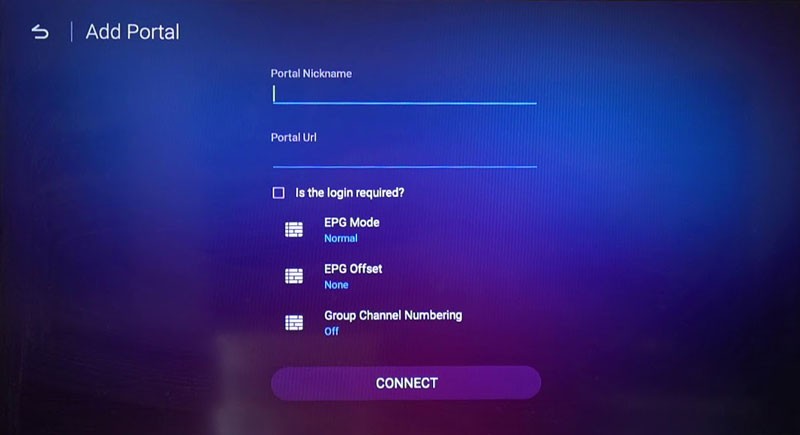
- Check your email for the IPTV subscription details (Portal URL, Username, and Password).
- In the Portal Nickname field, enter any name (e.g., IPTV Smarters Pro).
- In the Portal URL field, paste the URL provided in your email.
- Check the “Login Required” box to unlock login fields.
- Enter your Username (User ID) and Password from the email.
- Scroll down and click “Connect” to finalize the configuration.
- Your IPTV portal will load in seconds, showing all available live TV channels and VOD options.
✅ Enjoy smooth and high-quality IPTV streaming with MyTVOnline 2!
▶️ Watch the Video Tutorial: Click Here
